
© 2026 Rod Schmidt
With SwiftUI, everything has changed. As Brent Simmons said, it’s the end of the NeXT era and the beginning of the Swift era.
With the coming of SwiftUI, most of our app architectures are no longer valid (or at least parts of them). They need to be adjusted. MVC is certainly out. In fact, even controllers seem to be out. From Apple’s content, it seems all we have is models and views, and that’s true. Bindings have seemingly replaced controllers.
... ➦I recently found two more examples of Clean Architecture.
The first one is called CosyHome and is an example iOS application for a home heating system developed using Clean Architecture and developed with Acceptance Test Driven Development (ATDD) using Fitnesse. Fitnesse is something I’d like to dive more into and could be a future post. Let me know if you’re interested. You can find CosyHome here.
The other example is CleanNote that applies Clean Architecture to an iOS and Mac application. You can find that one here.
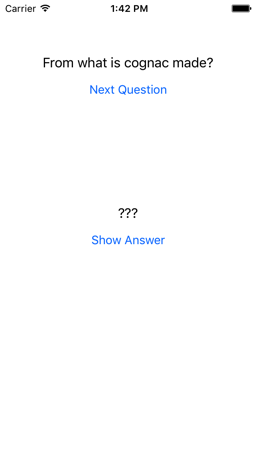
Today, I’d like to take an example iOS app written with an MVC architecture and show you what the example would be with a Clean Swift architecture. The example I’ve chosen to use is the Quiz app from chapter 1 of the 3rd edition of iOS Programming: The Big Nerd Ranch Guide.
The Quiz is a simple app that is like flash cards. It looks like this:
 ... ➦
... ➦In the last post, I talked about various architectures used as alternatives to MVC, in a attempt to solve MVCs problems, such as Massive View Controller.
In this post, I would like to introduce you to another architecture, which seems to me to be the best starting point for your app’s architecture: the Clean Architecture.
I think I first ran into the Clean Architecture in one of Uncle Bob’s presentations on YouTube. At first, I kind of wrote it off as a typical Java over-engineered design pattern. It wasn’t until earlier this year, probably years later after my initial discovery, that I ran into it again. I was looking for a better app architecture after an experience working for a large company with a large iOS team (with about 11 developers) and all the issues they had getting the app to work and test it. I kind of became obsessed with figuring out how to make an app easier to test. I searched the internet for app architectures and studied them. It took me awhile to get my head around the Clean Architecture, but once I did, I decided it would be my starting point for an app architecture.
... ➦In the last post, I talked about MVC, its problems, and how it could be done right. Various architectures have emerged to try to address the deficiencies of MVC. Before I talk about the Clean architecture, I’d like to talk about some of them.
Up front, I don’t have a lot of experience with these, but I have studied them and I believe they are a step in the right direction. They all introduce another object to take over some of the responsibilities from the controller, but I don’t think they go far enough because the new object typically has too many responsibilities as well and tends to grow just as the controller in MVC does. They do spread the load though, reducing the issues with MVC and increasing testability.
... ➦Model View Controller or MVC is the application architecture used by default for applications on all Apple platforms. Most of the tools, frameworks, and docs from Apple all talk about it and support it. In MVC, objects are assigned 1 of 3 roles:
Model - objects that encapsulate and manage the data the application works with (this includes persistence). The data typically represents things in the real world like an employee, hardware part, or a picture that is being drawn. More abstract things can also be part of a model such as a hiring process. When data in the model changes it notifies a controller object, typically via delegation or notifications. Model objects should have no knowledge of the user interface and be reusable in other applications in similar problem domains or on other devices.
Someone on the reddit iOS Programming group asked “What are the mistakes generally done by iOS developers while coding in Swift?”A lot of comments were about using force unwrapping on optionals. Comments such as:
var firstName: String! ughSo, I thought I would address these concerns and list 5 ways you can avoid force unwrapping.
... ➦A thread in the AskPrograming forum on reddit started with this question and I thought I would share my thoughts on planning and up-front design.
Basically, the originator of the thread is expressing his dislike of planning before coding, but thinks it’s a good idea because they’ve either been told that or seen others do it. They also expresses dislike for planning tools and wonders if there’s a better way. Basically, they want to know how do you plan and how do you break up a project into tasks that you need to do.
... ➦In part 3, I talked about why putting the MOC in the app delegate makes any code that uses the MOC will be dependent on the app delegate and why that’s not a good thing.
In part 2, I talked about why putting the MOC in the app delegate is a violation of the Single Responsibility Principle.
In part 1, I talked about why putting the MOC in your app delegate makes you dependent on Core Data for your application’s persistence.
... ➦In part 2, I talked about why putting the MOC in the app delegate is a violation of the Single Responsibility Principle.
In part 1, I talked about why putting the MOC in your app delegate makes you dependent on Core Data for your application’s persistence.
Today I like to talk about the 3rd reason I gave in part 1, which is:
myManagedObjectContext will be dependent on the App Delegate.Any code you write in another source file, say a subclass of UITableViewController for example, that uses myManagedObjectContext from the app delegate will be dependent on the app delegate. In Objective-C this would mean you would need a #import "AppDelegate.h statement in your subclass’ source file. Every source file that accesses the app delegate’s MOC would need that import, which would bring in everything else the app delegate uses. In Swift, you don’t need the import statement, but it would increase your compile times, as it would in Objective-C as well. Every time you made a change to the app delegate, any source files that accessed the MOC in the app delegate would have to be recompiled.